1
Order a server
Check the server offer to see whether Shield Basic is included and how the protected IP is assigned.
MYPS Shield adds the selected protection plan to eligible servers. Check the offer and client area to see which IP is protected and which rules, profiles and views are available.

Coverage, activation and management features depend on the selected product and assigned IP.
Check the server offer to see whether Shield Basic is included and how the protected IP is assigned.
Basic remains free. Pro and Gaming add features for the selected IP.
View attacks, switch modes and manage allowed services in the integrated panel.
Check the selected offer for network protection. Upgrades expand the controls available to you.
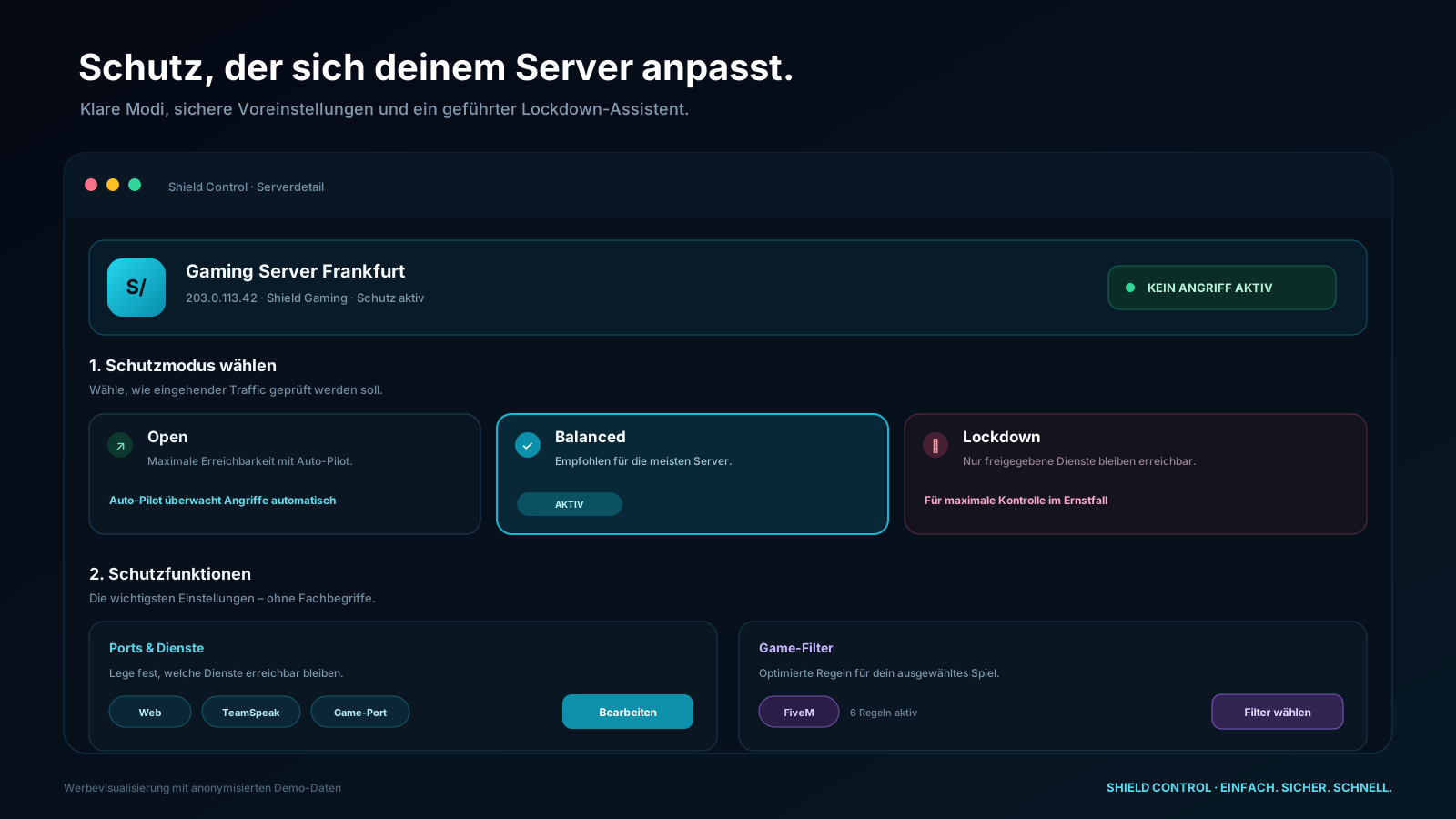
Instead of cryptic API fields, customers see clear protection modes, understandable effects and the features their plan allows.
Several protection layers work together, from the network edge to the individual service profile.
Clearly malicious traffic is dropped at the network edge.
All plansAutomatic rules target volumetric attacks as close to the source as possible.
All plansGranular analysis separates legitimate traffic from complex attack patterns.
Pro & GamingAllow or block selected countries, networks or providers.
Pro & GamingReady-made rules for FiveM, RedM, Minecraft, TeamSpeak and other services.
Shield GamingView attack type, destination IP, peak PPS, bandwidth and duration.
All plans
Check protection status, view mitigated attacks and open settings from your smartphone.
The key differences at a glance.
| Feature | Basic | Pro | Gaming |
|---|---|---|---|
| Automatic network protection | ✓ | ✓ | ✓ |
| View attacks and protection status | ✓ | ✓ | ✓ |
| Open mode with Auto-Pilot | ✓ | ✓ | ✓ |
| Balanced Mode | — | ✓ | ✓ |
| Custom port and service rules | — | ✓ | ✓ |
| Geo and ASN filters | — | ✓ | ✓ |
| Lockdown Mode | — | — | ✓ |
| Game profiles and custom presets | — | — | ✓ |
| Price per protected IP | Free | 20 €/month | 30 €/month |
The selected server offer and the explicitly protected IP address determine coverage. Automatic assignment for self-created cloud-pool VMs is not currently configured; booking a plan does not automatically cover them.
Yes. A different plan can be selected and changed later for each eligible server IP.
Auto-Pilot remains active and monitors attacks. Automatic protection logic intervenes when a threat is detected.
No. Shield Control is embedded in the MYPS client area and your product page.
Compare features and prices per protected IP. Each offer explains whether Basic is included and which activation steps are needed.